Build asset labels around proven linear symbologies like Code 128, EAN, and UPC, then send them to thermal or desktop printers straight from Find Asset. Set quiet zones, module width, and human-readable text so each label reads cleanly on the first pass.
Print one label or an entire batch. Pull serial ranges, filter by department, and lay out sheets or continuous rolls without leaving your asset register.
Send labels to a paired thermal printer from any device
From symbology selection to batch output, Find Asset covers the full label workflow for physical asset tracking.
Choose Code 128, Code 39, EAN-13, or UPC-A per label. Find Asset validates the data against each symbology's character set before it prints.
Send output to direct thermal and thermal-transfer label printers or standard desktop laser printers on Avery-style sheets.
Select a range of assets, an entire department, or a serial sequence and queue hundreds of labels in a single job.
Drag barcode, text, and logo elements onto a canvas sized to your stock, then save reusable templates for each label format.
Check quiet zones, module width, and contrast before printing so codes stay readable by handheld and phone scanners.
Print the asset ID beneath each barcode so staff can read and key values manually when a scanner isn't available.
Barcode labels connect the physical asset to its record. Getting the print right the first time saves hours of relabeling.
Batch printing turns a stack of new assets into a ready-to-apply roll of labels in one queued job instead of one-by-one.
Symbology validation and quiet-zone checks reduce the failed scans and manual re-entry that come from cramped or malformed codes.
Saved templates keep every label the same size, layout, and encoding across departments and print runs.
Each barcode encodes the asset's real ID, so a scan opens the exact record with no lookup guesswork.
A closer look at what the label module handles out of the box.
A barcode label is only useful if a scanner can read it, and readability starts with choosing the right symbology. Find Asset supports the linear codes that dominate asset tracking: Code 128 for dense alphanumeric IDs, Code 39 for legacy scanner compatibility, and EAN-13 or UPC-A when you are labeling retail-style inventory. Code 128 automatically shifts between its A, B, and C subsets to encode your data in the fewest bars, which keeps labels compact on small equipment.
Design matters as much as encoding. Every barcode needs a quiet zone, the blank margin on each side that tells a scanner where the code begins and ends. Squeeze it and reads fail. The label designer lets you set module width, bar height, and quiet zones directly, and it renders human-readable text beneath the bars so staff can key an ID by hand when needed. You lay these elements out once on a canvas sized to your stock and save it as a template.
Batch printing is where the module earns its keep. Instead of generating labels one at a time, select a department, a range of asset IDs, or a serial sequence and queue the whole set. Each label encodes that asset's real identifier, so scanning it later opens the correct record. Jobs route to direct thermal or thermal-transfer printers for durable rolls, or to a desktop laser printer on sheet stock.
Keeping codes scannable over time means printing at adequate resolution, holding strong contrast between bars and background, and matching label material to the environment. Preflight checks flag thin modules or tight quiet zones before you commit a run, so the labels that come off the printer read cleanly on the first pass.
Scannable Code 128 asset labels, printed and finished to your asset-ID scheme and branding.
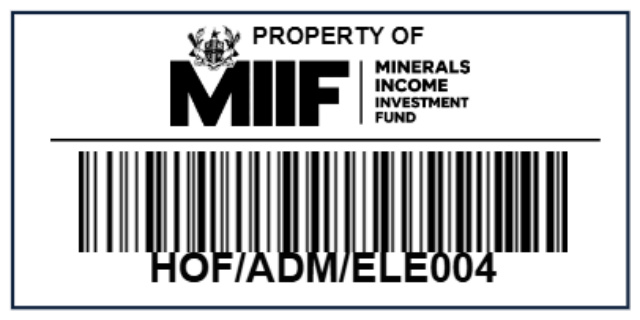
Alongside the label designer, Find Asset prints and supplies finished barcode labels — encoded to your real asset IDs, laid out with your logo and a "Property of" line, and produced on the stock that suits the job. Each label pairs a scannable Code 128 barcode with the human-readable ID beneath it, so an asset can be read by scanner or by eye.
Labels are printed with proper quiet zones and strong contrast for reliable first-pass scanning, and can be run on direct-thermal or thermal-transfer stock for durability. The sample shown was produced for the Minerals Income Investment Fund (MIIF).
Design your first barcode template and queue a batch in minutes. See how Find Asset turns your asset register into print-ready, scannable labels.
Start Free Trial