

Almost everyone builds their first asset register the same way: they open a spreadsheet, start typing in equipment, and only later realise the columns have quietly filled with chaos. One row says the location is "Head Office", the next says "HO", a third says "Main Branch — Accra", and all three mean the same place. The category column mixes "Laptops", "IT Equipment" and "Computers" for identical items, and nobody notices until a report tries to add them up and produces a total that makes no sense to anyone reading it.
When it is time to import that spreadsheet into a proper system, the mess comes with it, and someone spends an afternoon untangling what five minutes of planning would have prevented. The fix is to decide your structure before you record a single asset. Three simple lists do most of the work: categories, locations and departments. Settle them first, in plain language everyone recognises, and every asset you add afterwards falls neatly into place instead of adding another variation to an already tangled pile.
Three lenses, three different questions
Categories, locations and departments are not interchangeable labels; each answers a different question about an asset. A category answers "what kind of thing is this?" A location answers "where is it?" A department answers "who is responsible for it?" An office chair in the finance manager's room on the second floor is, all at once, a Furniture category, a second-floor location, and a Finance department asset. Keeping these three lenses separate in your head is the whole trick; problems start when people jam a location into the department column or blur a category into a room name.
The payoff for keeping them distinct shows up the moment you want to slice the register a different way. Because the three lenses are independent, you can ask the system to show every Furniture item regardless of where it sits, or everything on the second floor no matter which team owns it, or every asset Finance is accountable for across all three branches. Collapse two lenses into one column and you lose that flexibility permanently, because the information you would have filtered on was never recorded separately in the first place.
| Lens | Answers | Example |
|---|---|---|
| Category | What kind of thing is it? | Furniture & Fittings |
| Location | Where is it? | Head Office — 2nd Floor |
| Department | Who is responsible? | Finance |
Designing your category list: not too many, not too few
Categories group similar assets for reporting and for the tag codes you will generate later, so they should be broad enough to be useful and narrow enough to mean something. Too few — lumping every electronic device into "Equipment" — and your reports tell you nothing worth knowing. Too many — a separate category for every model of laptop — and staff never pick the same one twice. Aim for a list you could read aloud in under a minute. If you find yourself hesitating over which category an item belongs to, your list is either too fine or badly named.
A useful test is to imagine the reports you will actually want at year end. If you would like to know how much you spend replacing furniture, or how many vehicles you run, then Furniture and Vehicles earn their place as categories. If no report would ever separate "Dell laptops" from "HP laptops", then that distinction belongs in the asset name or a note, not in a category of its own. Let the questions you plan to ask the register decide the shape of the list, rather than the other way around.
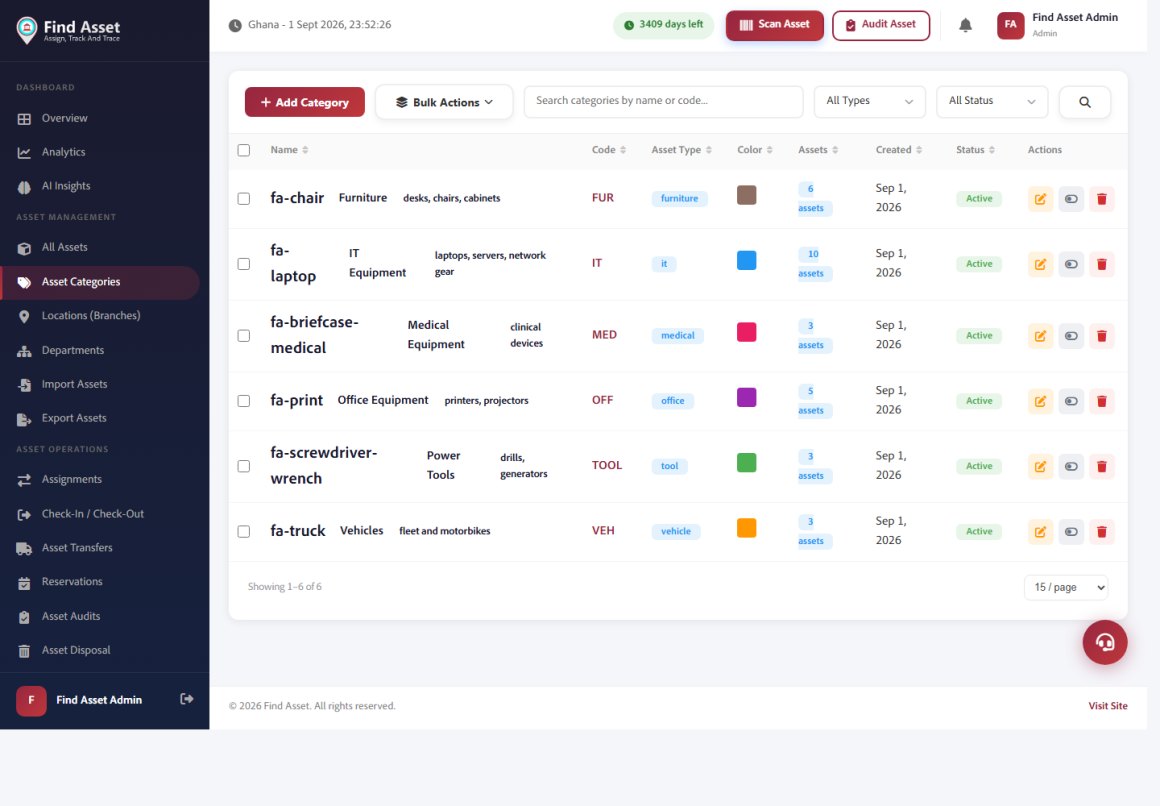
In Find Asset these are not free-text fields you retype each time — categories, locations and departments are structures you define once and reuse across every asset, list, filter and label. The category screen below shows how each one carries its own code, icon and colour, so a laptop, a vehicle and a medical device are instantly distinguishable wherever they appear.
Locations: physical places, named the way people speak
Locations should mirror the real geography of your organisation and, crucially, use the names your staff actually say out loud. If everyone calls it "the third-floor store", do not record it as "Storage Facility 3B". Decide, too, how finely you want to track location: some organisations stop at the branch, others go down to the individual room. Finer locations make a physical inventory count faster because you know exactly where to look. A good compromise for most is branch plus a meaningful sub-location — a floor, a wing or a named room — which is precise enough to find an item without becoming a burden to maintain.
Remember that locations describe where an asset physically sits, not who owns it, and the two drift apart constantly in real life. A finance laptop taken to a meeting on the fourth floor is still a Finance department asset, but its location for that afternoon is the fourth floor. Because you kept location and department as separate lenses, the register can hold both truths at once without contradiction. Record the place plainly and let transfers move an item between locations over its life, while its department accountability stays put unless the item is genuinely reassigned.
Departments: who carries the responsibility
Departments attach accountability to an asset. When a laptop goes missing, "which department was it assigned to?" is the first question, because that is who answers for it. Keep the department list aligned with how your organisation is actually structured — the same names that appear on your org chart, not invented groupings that only exist inside the asset system. A clean department list also makes reporting powerful: you can hand each head their own list of assets and quietly turn a central register into shared responsibility that everyone feels a stake in.
There is a management benefit here that goes well beyond tidy records. When a department head can see, on a single page, every item their team is accountable for, custodianship stops being an abstract policy and becomes something visible they can be asked about. Losses become conversations that start from a list rather than a shrug, and budgeting improves because each head can see what they already hold before requesting more. A department list that mirrors reality is the quiet foundation that makes all of that possible.
How the three build your asset codes
These lists are not just for filtering; in a well-designed system they combine to generate the asset tag itself. A common, readable pattern takes the first letters of the location, the department and the category, then adds a running number — so a Furniture item in the Finance department at Head Office becomes something like HOF/FIN/FUR001. Deciding your three lists first means these codes come out clean from the very first asset. If you want the tag scheme itself to age well, pair this with a proper asset tag numbering system.
The reason this matters is that a code built from your three lenses is human-readable at a glance, long before anyone scans it. A storekeeper reading HOF/FIN/FUR001 off a tag already knows it is a Head Office, Finance, Furniture item without opening the system at all. That legibility only survives if your lists are stable, which is exactly why you settle them before the first asset rather than after. Change a category name later and you either break the pattern for old items or face the awkward choice of re-tagging equipment that was labelled perfectly well.
Before you import a single row
- Write your category, location and department lists on one page.
- Merge duplicates ("HO", "Head Office", "Main Branch" → one name).
- Use the names staff actually say out loud.
- Keep categories few enough to read aloud in a minute.
- Confirm a newcomer could pick the right value without guessing.
Start lean and leave room to grow
There is a temptation, when setting up for the first time, to anticipate every possibility and build enormous lists — forty categories, a location for every cupboard. Resist it. Over-engineered structure is as harmful as no structure, because staff faced with forty near-identical categories will simply pick at random. Start with the lists you genuinely need today, kept lean, and add values only when a real asset arrives that does not fit. It is far easier to add a category next month than to untangle forty of them next year.
Growing the lists deliberately, one genuine need at a time, also keeps them meaningful in a way a big upfront guess never can. Each value you add earns its place because a real item demanded it, so the structure stays honest and every entry corresponds to something you actually own. Set a light rule that only an administrator can create new categories or locations, and you prevent the slow sprawl that turns a clean list back into the chaos you started with. Lean is not a limitation here; it is what keeps the whole thing usable for years.
Bringing it together
Fifteen minutes of thinking spares you an afternoon of cleanup, keeps your tags consistent, and means that when audit season arrives your register already answers the three questions that matter: what is it, where is it, and who is responsible. Settle your three lists, then record against them. If you would like a place where categories, locations and departments drive your tags automatically, you can start a free 14-day trial and set the structure up once.
The deeper point is that these three lists are not administrative housekeeping; they are the grammar your whole register speaks in for years to come. Get them right and every future report, audit and tag inherits that clarity for free, without anyone having to think about it again. Get them wrong and you pay a small tax on every single asset you ever add, forever. Half an hour of honest thought now is one of the highest-return decisions you will make in the entire setup, so give it the time it deserves.