

Ask anyone in charge of equipment where a particular laptop is right now and you will get one of a few answers: it is sitting in the store, someone is using it, it went off for repair, it is on a truck to another site, or it was written off last year. Each of those answers is a status, a single, agreed word that says where the asset stands in its working life. It is the smallest, most-read field in any register, and getting it right shapes how much you trust everything else.
A status scheme sounds trivial until you watch one go wrong. Too many statuses and nobody remembers which to pick; too few and you cannot tell a broken item from a busy one; vague ones that half the team interprets differently, and you end up with a register that looks tidy but says nothing. The good news is that a handful of clear principles cover almost every organisation, and Find Asset gives you the pieces to apply them from your first day.
What a status actually is, and why fewer is better
A status answers one question and one question only: what is happening to this asset today? Available means it is idle and ready to be handed out. Assigned means someone currently holds it. In maintenance means it has left normal service for repair or servicing. In transit means it is moving between locations. Retired or disposed means it has reached the end of its life and no longer counts as a working asset. Five or six words like these describe the entire life of almost any item you will ever track.
The temptation is always to add more, because reality has texture and every edge case seems to deserve its own label. Resist it. The value of a status set comes from everyone recognising each word instantly and choosing the same one without hesitation, and that shared certainty collapses the moment the list grows long enough that two people could reasonably pick differently. A short set is not a compromise you settle for; it is the whole point. If you are only starting out, our guide to getting started with Find Asset walks through the first fields worth defining before you tag a single item.
How a workflow turns statuses into a life story
Individual statuses are useful, but the real power appears when you arrange them into the order an asset actually travels through. That ordered path is a workflow: available becomes assigned when someone checks it out, assigned returns to available when they hand it back, either can drop into maintenance when something breaks, and any of them can end at retired when the item is finished. Drawn out, it is a small map of every legitimate path an asset can take.
Thinking in workflows rather than loose labels changes how you reason about your register. A status on its own tells you where an item sits; a workflow tells you where it can sensibly go next and, just as usefully, where it should never go. An asset cannot leap straight from retired back to assigned without someone deliberately un-retiring it, and a maintenance item should not quietly become available without passing an actual check. Modelling the real path, rather than treating statuses as a flat menu, is what lets the software catch the moves that do not make sense.
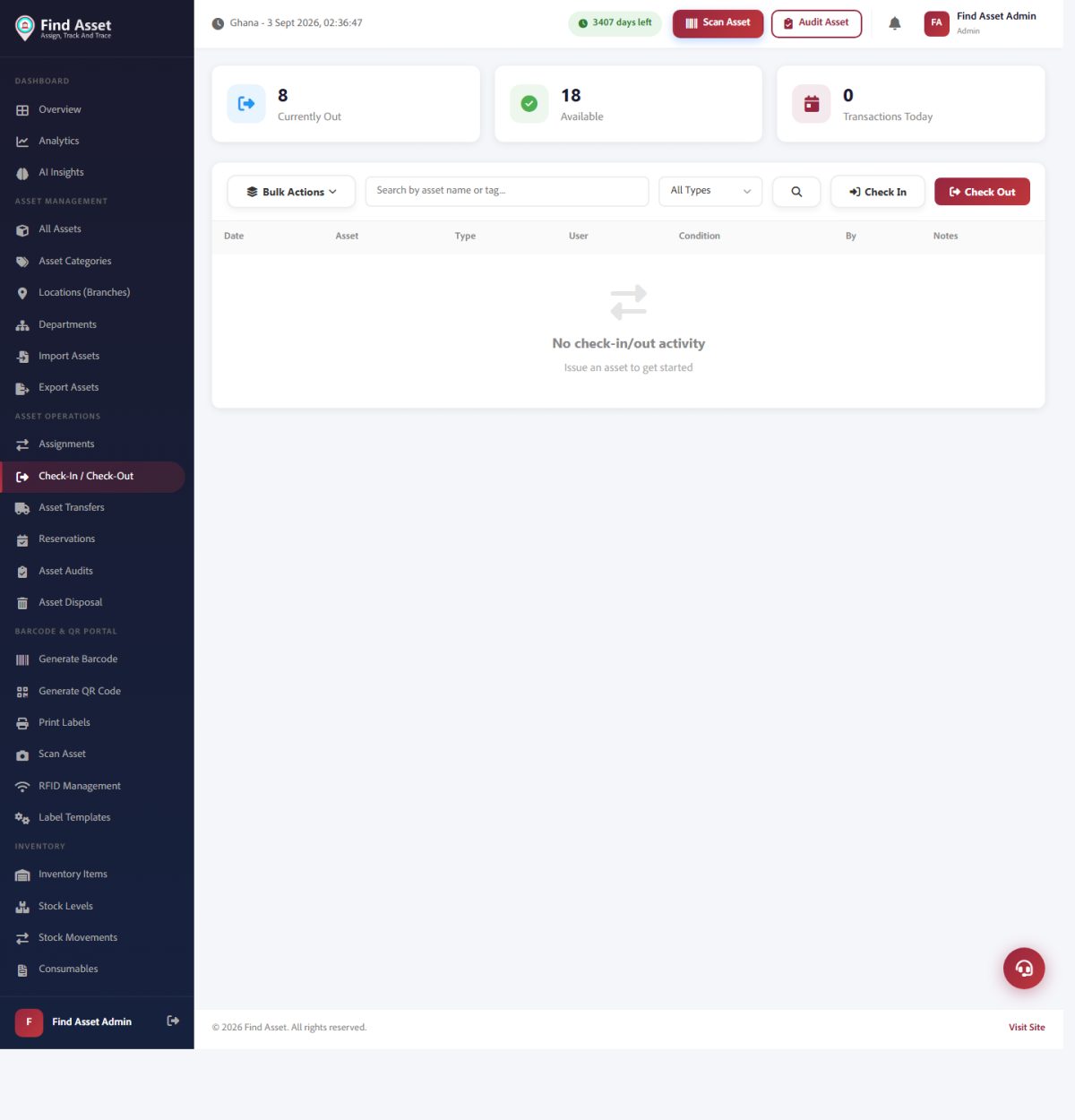
Statuses are only useful if they update themselves. In Find Asset, checking an asset out to a person or a job moves it to 'Assigned', and checking it back in returns it to 'Available' (screen above), the workflow, not manual editing, keeps each asset's status honest.
Who is allowed to change a status, and when
A status is only as trustworthy as the discipline behind who moves it. When anyone can set any asset to anything at any time, the field slowly stops meaning much, because you can no longer be sure the change reflects a real event rather than a stray click. The cleaner approach is to tie each transition to an action and a person: a storekeeper marks an item assigned by checking it out to a named holder, a technician moves it into maintenance when it physically arrives on the bench, and a manager signs off the retirement that removes it from service for good.
The point is not bureaucracy for its own sake; it is that a status change should record something that genuinely happened, made by the person in a position to know. Tying transitions to roles also gives you a quiet audit trail that turns the status field from a guess into evidence. Much of this falls naturally out of the check-out process itself, which we cover in assigning and checking out assets, where handing an item to a person and changing its status become a single deliberate step rather than two things someone has to remember separately.
Using statuses to filter, report and spot stuck assets
Once statuses are clean, they become the fastest lens you have on the whole register. Filtering to available tells you instantly what you can hand out this morning; filtering to in maintenance shows the queue of items out of action; filtering to assigned and grouping by holder reveals who is carrying what. None of this requires a spreadsheet or a special report, it is just the status field doing the job it was designed for, which is to make a large register answerable at a glance.
The subtler payoff is spotting assets that are stuck. An item that has sat in in transit for three weeks was almost certainly never received; a laptop that has been in maintenance for two months is either lost, forgotten, or quietly abandoned. Sorting by how long each asset has held its current status turns the field into an early-warning system. A status that changes on schedule is a healthy asset; one that has frozen is usually a problem waiting to be noticed.
The common mistakes that quietly ruin a scheme
Three failures account for most broken status schemes, and each begins as a small, reasonable decision. The first is too many statuses, a well-meaning attempt to capture every nuance that leaves staff scrolling a long list and guessing. The second is vague statuses, words like pending or processing that mean something different to everyone who reads them, so the field records confusion rather than fact. The third, and quietest, is statuses nobody updates: a scheme that is perfect on paper but ignored in practice, where items marked available were handed out weeks ago and no one changed anything.
What links all three is that they surface late, tangled up in reports and audits, long after the day the scheme was set. It is worth naming them plainly before you begin, because the cure for each is simple and cheap up front and painful to retrofit. Keep the list short so no one guesses; make every word describe an unmistakable real-world state; and tie updates to actions people already perform, so the status changes itself as a by-product of work rather than depending on someone remembering a separate chore.
The table below sets out the core statuses most organisations settle on, what each one means, and the event that typically moves an asset into it.
| Status | What it means | Typical trigger |
|---|---|---|
| Available | Idle and ready to be handed out | Returned or newly registered |
| Assigned | Currently held by a named person | Checked out to a holder |
| In maintenance | Out of service for repair or servicing | Sent to the bench or vendor |
| In transit | Moving between locations | Dispatched to another site |
| Retired / disposed | End of life, no longer a working asset | Signed off and written down |
What a clean status scheme gives you
- A small set of five or six words everyone recognises without hesitation.
- A workflow that models the real route and blocks moves that make no sense.
- Transitions tied to a person and an action, so each change records a real event.
- Instant filtering and reporting, plus early warning on assets that are stuck.
- None of the three classic traps: too many, too vague, or never updated.
Setting up a clean status scheme from day one in Find Asset
Starting fresh is the easiest time to get this right, because you can define the whole scheme before a single asset carries a status you might regret. Begin with the short core set (available, assigned, in maintenance, in transit, retired) and only consider adding a word once you have hit a real situation none of the five can describe honestly. Decide, for each status, which action moves an asset into it and which role is allowed to make that move, so the workflow is written down rather than improvised later under pressure.
It also helps to think of statuses as one chapter in the longer story of an item's life rather than a standalone setting, which is why they sit so naturally alongside asset lifecycle management. Set the scheme up once, tie it to the check-out and maintenance actions your team already performs, and the status field maintains itself as a by-product of ordinary work. That is the goal: a register where the status of every asset is current not because someone remembered to update it, but because updating it was simply part of doing the job.
Statuses that tell the truth
Asset statuses are the smallest field you will design and among the most consulted. Keep the set short so everyone picks the same word, arrange the words into a workflow that mirrors real operations, tie each change to a person and an action, and lean on the field to filter, report and catch the assets that quietly get stuck. Avoid the three classic traps (too many, too vague, never updated) and the field stays trustworthy for as long as you run the register.
If you take one idea from all of this, let it be that a status should record something that really happened, chosen by the person in a position to know. Get that right and your register answers honestly every time you ask it a question. If you would rather define your statuses once and let each check-out, repair and transfer update them for you, you can start a free 14-day trial and have a clean scheme running in a few minutes.