

Most asset registers do not fail because of the software. They fail because everyone with a login can do everything. A storekeeper deletes a location that three hundred assets depend on, a temporary intern edits acquisition costs to tidy up a report, and a branch manager quietly disposes of equipment that head office still counts as live. None of these people set out to cause harm. They simply had more access than their job required, and the system let them use it without a second glance or a single question.
Getting users, roles and permissions right is the least glamorous part of setting up Find Asset, and by some distance the most important. It is the difference between a register that stays trustworthy for years and one that drifts into fiction within a quarter. This guide walks through how to structure access properly, using the principle of least privilege as the backbone, so that every person sees exactly what they need and nothing they do not. Done once, thoughtfully, it protects your data quietly in the background without anyone having to police it day to day.
Start with the principle of least privilege
The rule is simple to state and surprisingly hard to follow under pressure: give each person the minimum access they need to do their job, and no more. When someone asks for broader rights, the default answer should be a question, which specific task requires it. Most of the time a narrower permission solves the actual problem, and the request for "full access" turns out to be shorthand for one particular thing they could not find rather than a genuine need to touch everything in the system.
The reason this matters goes beyond security. Every account with edit rights is a potential source of accidental damage. A finance officer who only ever needs to read depreciation figures should not carry the ability to delete an asset, because one mis-click on a busy afternoon can undo work that took months to build. Least privilege is as much about protecting people from honest mistakes as it is about stopping bad actors. Most damage to a register is careless, not malicious, and narrow permissions catch the careless case just as effectively as the deliberate one.
Map your organisation before you create a single account
Resist the temptation to start adding users immediately. Spend an hour first listing every distinct job that touches assets in your organisation. In a typical Ghanaian mid-sized firm that list looks something like this: an administrator who owns the whole configuration, a manager per branch, storekeepers or recorders who register and move items, an auditor who counts but never edits, and a finance user who reads values for reporting. Write the jobs down before the names, because the jobs are stable while the people filling them will change over the years.
Once you can name the jobs, the roles almost design themselves. A role is nothing more than a named bundle of permissions that matches one of those jobs. Get the mapping right on paper and the setup inside Find Asset becomes a quick, mechanical exercise rather than a series of second-guessed decisions made one awkward account at a time. The hour you spend on the org map is what turns role assignment from a judgement call into a simple lookup: this person does that job, so they get that role, and the conversation is over.
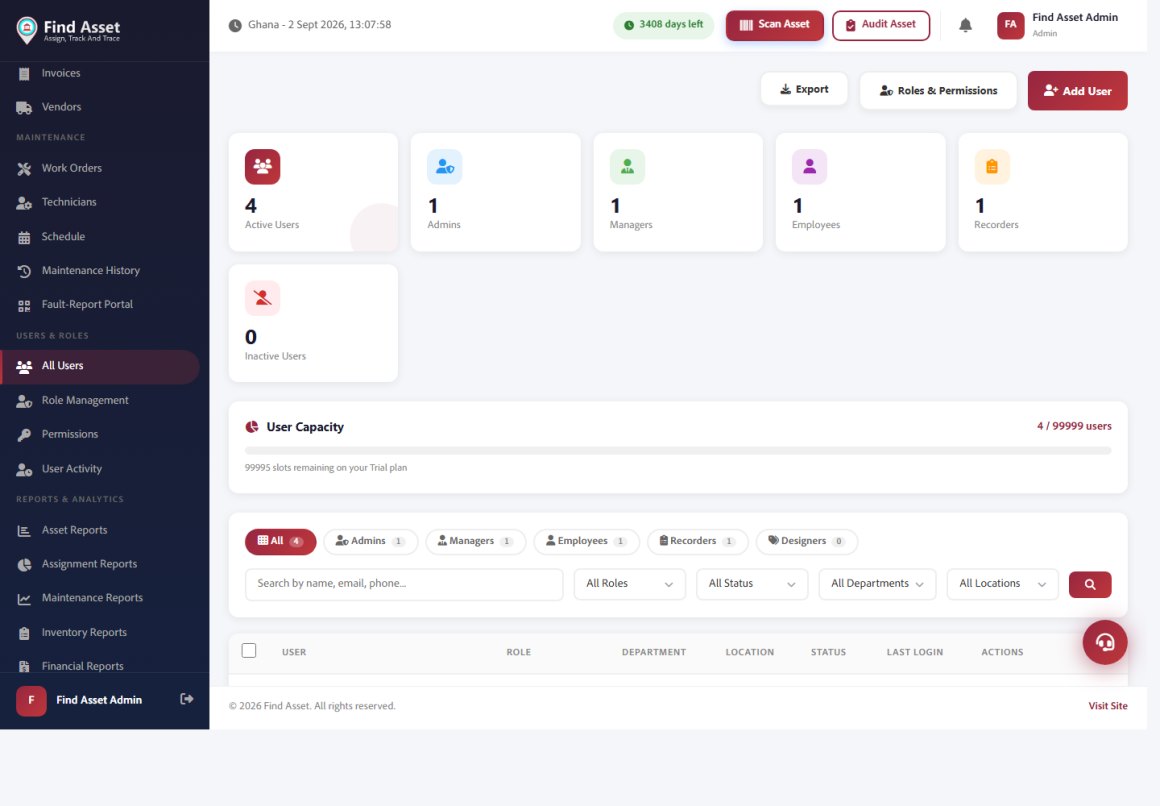
Getting people in is the first real step, and Find Asset keeps it simple. The users screen below shows your team by role — administrators, managers, employees and recorders — against your plan's user capacity, with tools to add, filter and manage them. You invite people, assign a role, and their access follows automatically from that role.
Understand the built-in roles before you customise
Find Asset ships with a set of ready-made roles that cover the common cases, so most organisations never need to invent their own. Each role maps to a real job and comes pre-scoped, which means you can be productive on day one without designing a permission matrix from scratch. It is worth learning what each one already does before you reach for custom permissions, because nine times out of ten the answer is already in the box, and a custom role you build in haste is one more thing to maintain and get wrong later.
| Role | Typical holder | Can do | Cannot do |
|---|---|---|---|
| Administrator | Operations or IT lead | Configure everything, manage users, set company defaults | Should be limited to one or two people only |
| Manager | Branch or department head | View and edit assets in their scope, approve transfers | Change company-wide settings |
| Recorder | Storekeeper, technician | Register assets, scan, log movements and custodians | Delete assets or edit financial values |
| Auditor | Internal audit, stock-take team | Run counts, view full history, flag discrepancies | Edit or delete any record |
| Finance | Accounts officer | Read costs, depreciation and reports | Move or reassign physical assets |
Notice how the "cannot do" column carries as much weight as the "can do" one. A well-designed role is defined at least as much by what it withholds as by what it grants, and that restraint is exactly what keeps your register honest over time. The auditor who cannot edit is trusted precisely because they cannot quietly fix a discrepancy into agreement, and the recorder who cannot touch financial values can move assets freely all day without ever endangering the numbers finance depends on.
Scope access to branches and locations, not just features
Permissions answer the question "what can this person do", but scope answers the equally important "to which assets". A manager in your Kumasi branch may have full edit rights, yet those rights should stop at the Kumasi boundary. If they can also edit Takoradi's stock, you have recreated the everyone-can-touch-everything problem in a subtler and harder-to-spot form, because the role looks perfectly reasonable on paper while quietly reaching across the whole organisation in practice.
Find Asset lets you bind a user to specific branches, departments or locations, so a role and a scope together produce a precise level of access. Set this up early. Retrofitting scope onto a live system after people have grown used to seeing the whole estate is far harder than starting narrow and widening deliberately when a genuine need appears, because taking access away always feels like a demotion even when it is simply a correction. If you are still organising your estate, our guide on how to build a proper fixed asset register pairs naturally with this step.
What good access design looks like
- Every user has exactly one role that matches their actual job, not their seniority.
- Editing rights are the exception, granted deliberately, never the default.
- Each account is scoped to the branches or locations that person genuinely works with.
- Administrator access is held by no more than two named people, with a documented backup.
Onboard and offboard people as a routine, not an afterthought
Access control is not a one-off setup task; it is a habit. The two moments that matter most are when someone joins and when someone leaves. New starters should be added against the role that fits their job description, ideally on their first morning, so they are productive without anyone lending them a shared login. Shared logins are the single fastest way to destroy an audit trail, because the system can no longer tell you who did what, and one borrowed password quietly becomes three within a month.
Offboarding is where most organisations slip. When a storekeeper resigns, their account often lingers for months, a live door into your data that nobody is watching or thinking about. Make deactivation part of the leaver's checklist alongside collecting the ID badge and the keys, so it happens automatically rather than depending on someone remembering. Deactivate rather than delete, so the history of everything that person recorded stays intact and auditable, and the trail of who moved which asset over the years does not vanish the moment they walk out of the building.
Lean on the audit trail to keep everyone honest
Roles decide what people can do; the audit trail records what they actually did. Find Asset timestamps changes against the user who made them, which turns vague disputes into simple lookups. When a laptop's custodian is questioned, you do not need a meeting, you need thirty seconds with the record. This is only possible because every person logs in as themselves, which loops back to why individual accounts matter so much and why a shared login quietly robs you of the one tool that settles arguments without anyone raising their voice.
Review the trail periodically, not just when something goes wrong. A quick monthly glance at who has been editing high-value assets often reveals a permission that has crept wider than intended, or a role that no longer fits how someone's job has evolved since you set it up. Access, like the asset register itself, needs the occasional cycle count to stay honest. Catching a drifted permission in a calm monthly review is far cheaper than discovering it during the panic of an incident, when trust is already in short supply.
Common mistakes and how to avoid them
The most frequent error is granting administrator rights out of politeness. A department head asks for "full access" and it feels awkward to refuse, so the button gets clicked and the moment passes. Six months later there are nine administrators and no one can say who changed the disposal settings or when. Treat the administrator role as you would a master key to the building, because that is effectively what it is, and no sensible organisation hands out master keys simply because someone found it rude to be told no.
The second common mistake is confusing job title with job function. A senior director may outrank a storekeeper, but the storekeeper is the one who physically moves assets and therefore needs recording rights the director does not. Roles should follow what people do, not where they sit on the organisation chart, and keeping that distinction clear makes the awkward conversations mostly disappear because the logic is obvious once stated plainly. For the wider discipline around this, the principle of least privilege is well worth a read.
Bringing it together
Good access control is quiet. When it is working, nobody notices it, because everyone can do their job and nothing breaks. The register stays accurate not through heroic clean-ups but because the people who could have corrupted it were never given the chance in the first place. Least privilege, role-to-job mapping, branch scoping and a living audit trail are not separate features; they are four expressions of the same discipline, and each one reinforces the other three quietly in the background.
Find Asset makes that discipline the default, with ready-made roles, branch-level scoping and a full audit trail out of the box, so you can protect your register without becoming a security specialist or hiring one. If you are ready to configure your team properly, start a free 14-day trial and set up your first roles in an afternoon. Spend that afternoon well and you buy yourself years of a register that tells the truth, which is the only kind worth keeping.